
This post contains affiliate links. If you buy through our links we may earn a small commission — at no extra cost to you. This never influences our recommendations.
UniFi Protect has a reputation as the “real” subscription-free security system — the one IT people and privacy-conscious homeowners actually recommend to each other, not just the one that advertises “no monthly fees” in bold on the box.
That reputation is earned. Recording, live view, AI detection, mobile app access — all of it, forever, for $0 a month.
Here’s what doesn’t make it into most reviews: you can’t just buy a UniFi camera and plug it in. There’s a piece of hardware you need first, and skipping that step is the single most common mistake first-time buyers make.
| Spec | UniFi G6 Bullet |
|---|---|
| Resolution | 4K (3840×2160), 30 FPS |
| Night vision | IR up to 98 ft |
| AI detection | Face, license plate, person, vehicle, animal |
| Weatherproofing | IP66, IK04 tamper-resistant |
| Power | PoE (37–57V DC) |
| Subscription required | None |
Wait, You Need a Console Too?
Yes. Every UniFi camera needs something running UniFi Protect to actually talk to — a UniFi Gateway (like the Cloud Gateway Ultra or a Dream Machine) or a standalone NVR (like the UNVR).
Without one of those, the camera does nothing. It’s not a standalone smart camera the way a Ring or Wyze is — it’s a component in a system, and the console is the part that makes the system work.
The good news: a single compact console like the Cloud Gateway Ultra handles both your network routing and your Protect recording, so it’s not really “extra” hardware if you’re setting up a home network anyway. It’s just hardware you have to know to buy.
What This Actually Costs You Upfront
No subscription doesn’t mean no cost — it means the cost moves entirely to day one instead of spreading out monthly.
A realistic starter setup looks like one or two G6 Bullet cameras (around $199 each), a Cloud Gateway Ultra to run Protect, and a storage drive if your console doesn’t already include one.
Compare that to the alternative: a two-camera Ring or Arlo setup runs $72 to $480 in subscription fees over just two years. Run UniFi long enough and the higher sticker price up front turns into the cheaper option overall.
The math favors UniFi more the longer you keep the system and the more cameras you add — it favors Ring or Arlo if you just want one camera and might cancel in six months.
The Closed Ecosystem Trade-Off
UniFi Protect only works with UniFi cameras. Already own a Reolink or Amcrest camera you like? It’s not joining this system.
That’s different from software-based options like Synology Surveillance Station or Blue Iris, which support generic ONVIF cameras from multiple brands. UniFi trades that flexibility for tighter integration and genuinely zero-configuration setup.
It’s also wired-only — every camera runs on PoE, meaning an actual Ethernet run to each one, not a battery you charge every few months. If you’ve read our Reolink RLK8-800B4 review, this is the same trade-off: real installation effort in exchange for always-on, subscription-free recording.
Pros: Genuinely zero subscription for every core feature, forever; sharp 4K video with real AI detection; NDAA compliant, cleared for federal and enterprise use; tight, polished ecosystem with almost no configuration headaches.
Cons: Requires a separate console purchase most first-time buyers don’t expect; closed ecosystem, no mixing in other camera brands; wired PoE installation only, no wireless option; higher day-one cost than subscription-based competitors.
Best for: Homeowners planning more than one or two cameras long-term, or anyone already running (or willing to run) a UniFi network who wants recording that never has a monthly bill attached.
UniFi G6 Bullet Camera
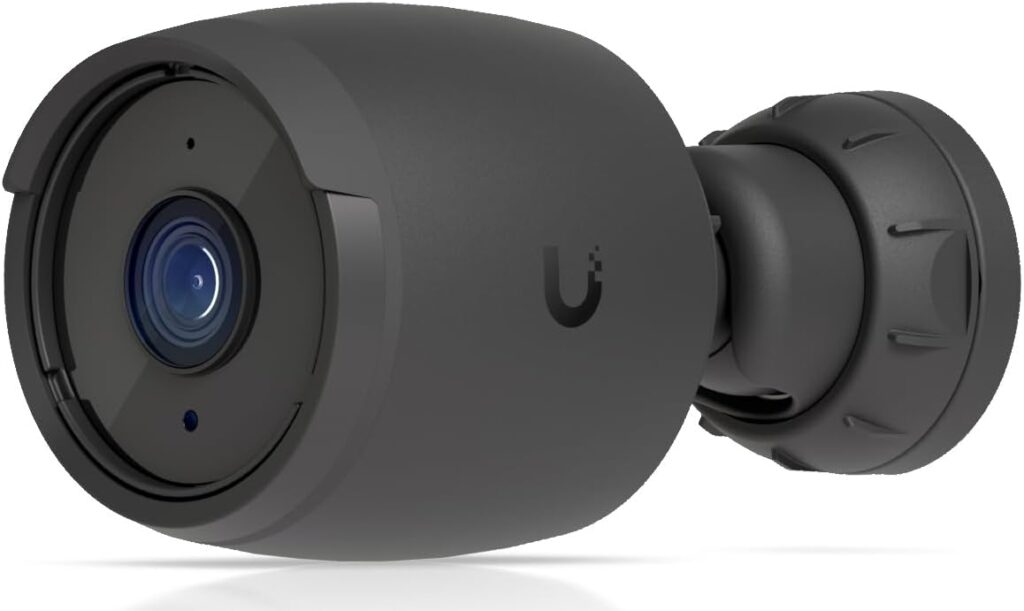
Full details and current price: UniFi G6 Bullet Camera on Amazon
UniFi Cloud Gateway Ultra (Required Console)
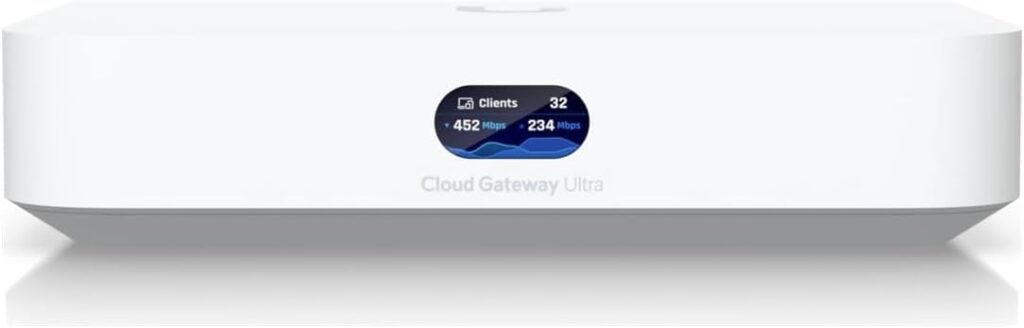
Full details and current price: UniFi Cloud Gateway Ultra on Amazon
Frequently Asked Questions
Do UniFi Protect cameras really have no subscription fee?
Correct — recording, live view, AI detection, and mobile app access are all included with no recurring cost. Optional paid add-ons like extra cloud backup exist, but nothing core requires them.
Can I use a UniFi camera without buying a console?
No. Every UniFi camera needs a UniFi Gateway or standalone NVR running Protect to function — the camera alone won’t do anything on its own.
Can I mix UniFi cameras with other brands?
No, UniFi Protect only works with UniFi’s own cameras. If you want multi-brand flexibility, a software NVR like Blue Iris or Synology Surveillance Station is the better fit.
Are UniFi cameras wireless?
No, they run on PoE, which means an Ethernet cable to each camera for both power and data — there’s no battery-powered option in the UniFi Protect lineup.
Is UniFi Protect actually cheaper than Ring or Arlo long-term?
Usually, if you keep the system for more than a year or two and run more than one camera — the upfront cost is higher, but there’s no monthly fee ever eating into that savings.
Final Verdict
UniFi Protect earns its reputation — genuinely free forever, sharp hardware, and a system that just works once it’s set up. Just budget for the console alongside the camera, because the camera by itself won’t do a thing.