
This post contains affiliate links. If you buy through our links we may earn a small commission — at no extra cost to you. This never influences our recommendations.
A security camera subscription can quietly cost more than the camera itself. Ring Protect, Nest Aware, and similar plans typically run $100–300+ per year — over five years, that’s frequently more than a quality camera’s entire purchase price. The good news: several brands now build genuinely full-featured cameras that store footage locally and deliver every core feature — AI detection, night vision, live viewing, playback — without a monthly fee attached to any of it.
This guide is your starting point for finding the right subscription-free camera, whatever you’re covering. It explains what “no subscription” actually means, what to check before buying, and the best picks across indoor, outdoor, and multi-camera setups.
What “No Subscription” Actually Means
This phrase gets used loosely, so it’s worth being precise. A genuinely subscription-free camera stores footage locally — either on a microSD card inside the camera, or on a home hub/NVR you own — and delivers full functionality without requiring any monthly payment.
The common trap: some brands advertise “works without a subscription” but quietly gate the features people actually want — extended video history, smart AI alerts, or even basic recording — behind an optional paid tier. Ring is the clearest example: most Ring cameras record only through a Ring Protect subscription, with no meaningful local storage option. Always confirm a camera delivers full functionality on local storage alone before assuming it’s truly subscription-free.
Local Storage: microSD vs Hub/NVR
Subscription-free cameras store footage one of two ways, and the choice affects both convenience and capacity.
MicroSD card (in-camera): The camera stores footage directly onto a card slot inside its own housing. Simple, no extra hardware needed, but capacity caps at whatever card size the camera supports — typically 128–512GB. At 4K resolution, cards fill faster than expected, and the camera automatically overwrites the oldest footage once full.
Home hub / NVR: The camera connects wirelessly to a dedicated base station that houses the actual storage — sometimes expandable to multiple terabytes via an external hard drive. This is the better option for multi-camera setups and longer video history, at the cost of an additional device to buy and set up. For a full breakdown of when each approach makes sense, see our local storage vs cloud storage guide.
What to Check Before You Buy Any Camera
Weatherproofing (IP rating): Only relevant for outdoor cameras — IP65 minimum, IP67 for harsher climates. Indoor cameras don’t need this rating at all.
Power source: Battery cameras need periodic recharging or a solar panel for indefinite outdoor use. Wired cameras solve power entirely but need a nearby outlet.
Night vision quality: Color night vision identifies faces and details far better than traditional black-and-white infrared. Prioritize it if identification matters, whether indoors or out.
AI detection accuracy: Person/vehicle/pet/crying detection cuts false alerts dramatically versus basic motion detection. Confirm this is included free — it’s one of the features some brands lock behind a paywall.
Continuous vs. motion-triggered recording: Most battery-powered cameras record in motion-triggered clips to conserve battery, not continuously. If true 24/7 recording matters, a wired camera is the only option.
Best Security Cameras Without Subscription — By Category
| Product | Type | Resolution | Storage | Best For |
|---|---|---|---|---|
| Reolink Argus 4 Pro | Outdoor | 4K dual-lens | microSD, up to 512GB | Best overall outdoor pick |
| eufy Indoor Cam E30 | Indoor | 4K | microSD (optional HomeBase) | Best overall indoor pick |
| eufyCam S3 Pro 2-Cam Kit | Outdoor, multi-camera | 4K | HomeBase, up to 16TB | Best whole-property system |
| eufy SoloCam S340 | Outdoor | 3K dual-lens | 8GB built-in | Best budget standalone |
Best Overall Outdoor Pick: Reolink Argus 4 Pro
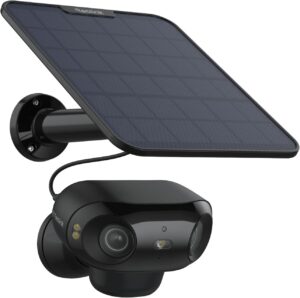
The Argus 4 Pro delivers genuine 4K dual-lens coverage with a seamless 180° blindspot-free view, ColorX night vision that renders full color detail in near-total darkness, and complete AI person/vehicle/animal detection — none of it locked behind a subscription. It works as a true standalone camera, recording to a microSD card (up to 512GB, sold separately) with no hub required.
The included 6W solar panel keeps it running indefinitely in most climates, and dual-band Wi-Fi 6 handles smooth 4K streaming without lag. For a single outdoor camera covering a driveway, front door, or backyard, this is the strongest starting point available. For a deeper dive, see our full Reolink Argus 4 Pro review.
Pros: True 4K dual-lens 180° coverage, ColorX color night vision, solar panel included, standalone with no hub required, full AI detection with no paywall
Cons: Cannot record continuously — motion-triggered clips only; microSD card sold separately
Best for: Single-camera outdoor coverage, buyers who want maximum capability without committing to a hub ecosystem
Best Overall Indoor Pick: eufy Indoor Cam E30

For indoor coverage, the eufy Indoor Cam E30 is the camera independent reviewers consistently rank highest — 4K resolution, color night vision with an integrated spotlight, and on-device AI that distinguishes people, pets, and even crying sounds, all without a mandatory subscription. 360° pan-and-tilt with auto-tracking follows movement around a room, useful for pet monitoring, baby monitoring, or general indoor coverage.
It works natively with Apple HomeKit, Alexa, and Google Home — genuinely broad smart home compatibility. Storage runs through a microSD card by default, with the option to add a HomeBase hub later for expanded capacity if needed. Two-way audio lets you communicate directly through the camera. This is the clear default choice for anyone covering a room, nursery, or entryway indoors.
Pros: True 4K resolution, color night vision with spotlight, 360° auto-tracking, native HomeKit/Alexa/Google support, two-way audio, no mandatory subscription
Cons: microSD card sold separately; pan/tilt motor can be audible during tracking
Best for: Indoor rooms, nurseries, pet monitoring, entryways, anyone wanting broad smart home integration
Best Whole-Property System: eufyCam S3 Pro 2-Cam Kit
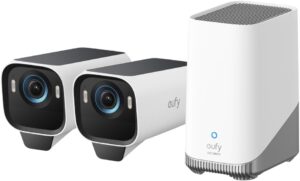
For covering multiple angles of a property at once, the eufyCam S3 Pro pairs radar detection with traditional PIR motion sensing — a dual-detection approach that eufy reports reduces false alerts by 99% compared to PIR alone. MaxColor night vision delivers full-color footage in near-darkness without a visible spotlight.
Storage runs through the HomeBase S380 hub, expandable up to 16TB via external hard drive — enough for months of footage across multiple cameras without ever thinking about capacity. IP67 weatherproofing handles genuinely harsh conditions, and the kit includes a backup solar panel. The trade-off is committing to the HomeBase ecosystem, which only works with eufy’s own lineup. For the full review, see our eufy S3 Pro review.
Pros: Radar+PIR dual detection (99% fewer false alerts), MaxColor night vision, expandable to 16TB, IP67 rated, includes backup solar panel
Cons: Requires HomeBase S380 hub; locks you into the eufy ecosystem for future expansion
Best for: Multi-camera property coverage, buyers planning to expand their system over time
Best Budget Standalone: eufy SoloCam S340
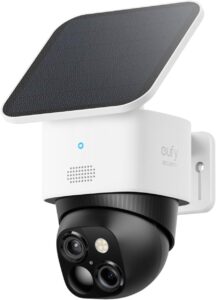
The SoloCam S340 delivers real features at a fraction of the S3 Pro’s price — 3K dual-camera clarity with 8x zoom, full 360° pan-and-tilt coverage, and 8GB of built-in storage requiring no additional purchase to start recording. The removable solar panel needs just 2 hours of daily sunlight to maintain a full charge indefinitely.
Setup takes about 7 minutes, and while it can optionally connect to a HomeBase S380 for expanded storage, it works as a fully capable standalone camera without one. For buyers who want solid outdoor coverage without stepping up to 4K pricing, this is the smart entry point.
Pros: Built-in 8GB storage (no purchase needed), 360° pan-and-tilt eliminates blind spots, solar-powered with minimal sun required, standalone or HomeBase-compatible
Cons: 3K rather than 4K resolution; base storage fills relatively quickly at higher activity levels
Best for: Budget-conscious buyers, first-time security camera purchases
When a Subscription Actually Makes Sense
Subscription-free isn’t the right answer for every situation. A paid plan is worth considering if you want professional monitoring that dispatches police or fire automatically when an alarm trips — that service is inherently a paid offering since it involves a live monitoring center, not just storage.
Off-site cloud backup is also a genuine advantage of paid tiers for households running many cameras — if a camera is stolen or a microSD card fails, cloud-stored footage survives even when the physical camera doesn’t. For most residential use, local storage delivers full protection without the recurring cost.
Frequently Asked Questions
Do subscription-free security cameras still work with Alexa and Google Home?
Yes — all the cameras in this guide integrate with Alexa and Google Home for voice commands and live feed viewing. Apple HomeKit compatibility varies by brand; the eufy Indoor Cam E30 offers native HomeKit support, worth checking if that matters to your setup.
Which brands actually offer subscription-free cameras?
Eufy, Reolink, Wyze, Lorex, Tapo, and Aqara all build cameras with genuine local storage and full feature access with no mandatory fee. Ring and most Nest/Google cameras, by contrast, require a subscription for core recording and storage — verify this distinction carefully before buying based on marketing claims alone.
Can these cameras record continuously, 24/7?
Battery-powered cameras — including most on this list — record in motion-triggered clips rather than continuously, to conserve battery life. If true 24/7 continuous recording matters, a wired camera connected to constant power is the only way to achieve it.
Is local storage as secure as cloud storage?
In some ways more secure — footage stored locally never passes through a third-party server, meaning no company or government entity can access it without a physical search warrant. The trade-off is that if the physical device is stolen or destroyed, footage is lost unless backed up elsewhere.
How much storage do I actually need?
For a single camera with moderate activity, a 128GB microSD card typically holds several weeks of motion-triggered footage at 4K resolution. Multi-camera setups or high-traffic areas fill storage faster — a hub system with terabyte-scale expansion is the better fit if you’re covering several cameras or want months of history.
Final Verdict
| Your Situation | Best Pick |
|---|---|
| Single outdoor camera, maximum capability | Reolink Argus 4 Pro (B0D8HY411D) |
| Indoor room, nursery, or pet monitoring | eufy Indoor Cam E30 (B0DJVGZQW7) |
| Multi-camera property coverage | eufyCam S3 Pro 2-Cam Kit (B0DDPW1YK2) |
| Budget-friendly outdoor camera | eufy SoloCam S340 (B0CLFVC6ZG) |
Whatever you’re covering, a genuinely subscription-free camera no longer means settling for lesser features. For a single outdoor camera, the Reolink Argus 4 Pro delivers the strongest all-around package. For indoor coverage, the eufy Indoor Cam E30 is the clear default. And if you’re covering an entire property, the eufyCam S3 Pro system is worth the investment in the HomeBase ecosystem.
For related buying guides, see our best video doorbells without monthly fees and best NVR systems without subscription guides to round out a complete subscription-free home security setup.