
This post contains affiliate links. If you buy through our links we may earn a small commission — at no extra cost to you. This never influences our recommendations.
Smart locks are one of the few smart home categories where “subscription-free” is actually the norm rather than the exception. Unlike cameras and doorbells, where cloud storage genuinely costs money to provide, a lock’s core functions — fingerprint matching, keypad codes, app unlock, auto-lock — all run locally on the device itself. There’s no video to store, no cloud bandwidth to pay for. This guide covers what to look for in a genuinely subscription-free smart lock, and the best picks across price points and entry methods.
Why Smart Locks Rarely Need a Subscription
A smart lock’s job is binary — lock or unlock — and every method of triggering that (fingerprint, PIN code, app, key fob, auto-unlock via proximity) can be processed entirely on the lock’s own hardware. Fingerprint data is matched locally against templates stored on the device. Access codes live in the lock’s own memory. None of this requires ongoing cloud infrastructure the way continuous video recording does.
Where subscriptions occasionally creep in: some brands gate long-term access logs, multi-property management for landlords, or advanced automation rules behind a paid tier. The core unlock functionality, though, should never require payment — if a lock’s basic keypad or fingerprint unlock is paywalled, that’s a red flag worth walking away from.
Hub-Free WiFi vs Bluetooth-Only vs Gateway-Paired
Built-in WiFi (no hub required): The lock connects directly to your home Wi-Fi network, giving you remote access, app notifications, and voice assistant integration without buying any additional hardware. This is the simplest setup for most households and the category all three picks below fall into.
Bluetooth-only: Works for local unlock (standing at the door with your phone) but has no remote access unless you’re within Bluetooth range. Cheaper, but you lose the ability to check lock status or grant access when you’re away from home.
Gateway/hub-paired: The lock itself uses a lower-power protocol (Z-Wave, Zigbee, or the brand’s proprietary radio) and requires a separate hub or bridge — sold separately — to enable remote access and voice control. This adds cost and setup complexity, but can offer better battery life since the lock isn’t running WiFi radio constantly.
What to Check Before Buying
Entry methods: Fingerprint, keypad PIN, smartphone app, physical key backup, and auto-unlock (unlocking automatically as you approach with your phone) cover the range most households want. More entry methods mean more flexibility for different family members — kids without phones can use a code, guests can use a temporary PIN, you can use fingerprint for speed.
BHMA/ANSI grade certification: This is the residential security industry’s standard rating for durability and resistance to forced entry. Grade 1 is commercial-level security, Grade 2 is the recommended residential standard, Grade 3 is basic residential. Look for at least Grade 2 on a front door.
Battery life and backup power: Most smart locks run 4–12 months per charge or battery set. Confirm the lock has a way to unlock if the battery dies completely — either a physical key backup or an external emergency power port (typically 9V battery or USB-C contact).
Auto-lock: A genuinely useful safety feature — the door locks itself automatically after a set delay once closed, so a forgotten lock-up doesn’t leave your home exposed overnight.
Weather rating: IP65 is the standard for exterior door locks, indicating resistance to dust and water jets. Confirm this explicitly for any front or back door installation.
Best Smart Locks — Verified Picks
| Product | Entry Methods | Connectivity | Certification | Best For |
|---|---|---|---|---|
| eufy Smart Lock E31 | Fingerprint, keypad, app, key, voice | Built-in WiFi, no hub | BHMA certified, IP65 | Best overall |
| Ultraloq U-Bolt Pro WiFi | Fingerprint, code, app, auto-unlock, key | Built-in WiFi, no hub | ANSI Grade 1, IP65 | Best for large households |
| Schlage Encode | Keypad, app, key | Built-in WiFi, no hub | BHMA highest rating | Best trusted brand, Airbnb hosts |
Best Overall: eufy Smart Lock E31
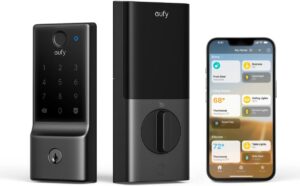
The E31 delivers the cleanest combination of speed, simplicity, and genuine subscription-free operation — and adds Matter and Apple Home support that eufy’s previous-generation locks lacked, making it the more future-proof pick for mixed smart-home households. Fingerprint recognition takes just 0.3 seconds and stores match data entirely on the lock itself, a privacy-first design choice rather than just a technical detail. Built-in WiFi means no separate bridge or hub purchase for Alexa, Google, or SmartThings; a compatible Matter hub adds Apple Home on top of that.
A built-in sensor auto-locks the door the moment it closes, and the zinc alloy and stainless steel construction is BHMA-tested to handle 250,000 lock/unlock cycles — roughly 10 uses per day for over 30 years. The 10,000mAh rechargeable battery is rated for up to 14 months per charge at typical usage (about 10 unlocks a day), ahead of both the 4–6 months typical of AA-battery competitors and eufy’s own prior-generation battery life. Five ways to unlock — fingerprint, keypad, app, physical key, and voice command via Siri, Alexa, or Google Assistant — cover essentially every household member’s preference. IP65 weatherproofing handles rain, snow, and temperature extremes from -22°F to 158°F.
Pros: 0.3-second fingerprint recognition, built-in WiFi with no hub required for most ecosystems, up to 14-month rechargeable battery life, Matter and Apple Home support, BHMA tested for 250,000 cycles, IP65 rated
Cons: Apple Home specifically requires a separate Matter-compatible hub; 2.4GHz WiFi only
Best for: Most households wanting a fast, reliable, genuinely fee-free smart lock — especially mixed Apple/Android/Alexa households
Best for Large Households: Ultraloq U-Bolt Pro WiFi
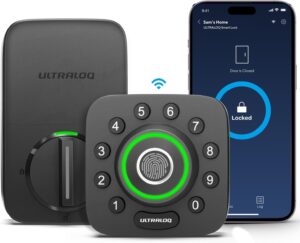
The U-Bolt Pro WiFi offers more distinct entry methods than any other lock in this guide — fingerprint (stores up to 100 prints, 2 per user), passcode (up to 50 unique codes), smartphone app, auto-unlock via Bluetooth proximity, and physical key backup, all without requiring a separate hub. For households with different generations, different comfort levels with technology, or frequent guests, this range of options means everyone gets an entry method that actually works for them — kids who lose things get a code, grandparents who resist apps get a key, everyone else gets fingerprint speed.
An included door sensor detects when the door is actually closed before auto-locking, preventing the common failure mode where a lock engages the deadbolt against an open door frame. ANSI Grade 1 certification — commercial-level security — exceeds the residential Grade 2 standard most competitors carry. Built-in WiFi connects directly to home networks with no bridge required, and the lock integrates with Alexa, Google Assistant, SmartThings, and IFTTT for broader home automation.
Pros: Most entry methods of any lock in this guide (8-in-1), ANSI Grade 1 commercial-rated security, included door sensor prevents false auto-lock, no hub required, broad smart home integration
Cons: 2.4GHz WiFi only; battery life (roughly 1 year on AA batteries) is solid but not class-leading
Best for: Larger families, rental properties, Airbnb hosts, and households wanting maximum flexibility in how each person unlocks the door
Best Trusted Brand: Schlage Encode
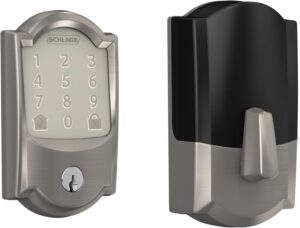
Schlage has been in the lock business for over a century, and the Encode reflects that legacy — consumers have ranked Schlage the most trusted lock brand for seven consecutive years in independent research, and the Encode carries BHMA’s highest certification for security, durability, and finish. Built-in WiFi connects directly to home networks with no hub purchase required, and the touchscreen keypad supports up to 100 unique access codes.
The standout feature for hosts specifically is native Airbnb integration — connect the Encode to an Airbnb host account and guest access codes generate and expire automatically tied to each booking, with zero manual code management. A built-in alarm detects forced entry attempts and sounds automatically, a security layer most competitors in this price range don’t include. The fingerprint-resistant touchscreen keeps the keypad looking clean despite daily use, and installation takes just minutes with a screwdriver — no hardwiring.
Pros: Most trusted lock brand for 7 consecutive years in independent surveys, BHMA highest security/durability/finish rating, built-in forced-entry alarm, native Airbnb integration, no hub required
Cons: No fingerprint entry (keypad and app only); AA battery life around 6 months, shorter than eufy’s rechargeable option
Best for: Buyers who prioritize brand trust and proven security certification, Airbnb and short-term rental hosts
Fingerprint vs Keypad — Which Matters More?
Fingerprint entry is faster in daily use — under a second, versus several seconds to enter a PIN — and eliminates the risk of someone watching you enter a code. But a keypad is more universally reliable: it works with gloves on, doesn’t fail on wet or dirty fingers the way some biometric sensors can in bad weather, and doesn’t require registering every family member’s fingerprint individually.
The strongest approach for most households is a lock offering both, used as complementary methods rather than either/or — fingerprint for daily household use, keypad codes for guests, service people, and backup when a finger is too cold or wet for reliable biometric reading. Both the eufy E31 and Ultraloq U-Bolt Pro WiFi above offer this combination; the Schlage Encode is keypad-only, which is the main trade-off for its brand trust and Airbnb integration advantages.
Frequently Asked Questions
Do smart locks require a monthly subscription?
No — the core functions of a quality smart lock (fingerprint matching, keypad codes, app unlock, auto-lock) all run locally on the device and never require a monthly fee. All three locks in this guide offer complete functionality with zero subscription cost. Be cautious of any lock that gates basic unlock methods or access code management behind a paid tier — that’s not how the category is supposed to work.
What happens if my smart lock’s battery dies?
All three locks in this guide include a physical key backup, so you’re never fully locked out even with a completely dead battery. Additionally, most models support emergency external power — a 9V battery or USB-C contact point that can temporarily power the lock’s electronics long enough to unlock and replace the batteries. Always confirm your specific model has one of these fail-safes before relying on it as your primary front door lock.
Can I install a smart lock myself?
Yes — all three locks in this guide are designed for DIY installation with just a screwdriver, typically taking 10–30 minutes. They’re built to fit standard US door prep (existing deadbolt hole dimensions), though it’s worth measuring your door’s backset, cross bore, and thickness against the product specifications before ordering to confirm compatibility.
Are smart locks as secure as traditional deadbolts?
Quality smart locks with BHMA or ANSI grade certification meet or exceed the security standards of traditional mechanical deadbolts, and add benefits traditional locks can’t offer — forced entry alarms, access logs showing who entered and when, and the ability to instantly revoke a lost key’s access (impossible with a physical key that could be copied). Look for at least Grade 2 residential certification, and Grade 1 for the highest available security rating.
Do smart locks work during a power outage?
Yes — smart locks run on their own internal batteries (typically AA batteries or a rechargeable pack), completely independent of household electrical power. A home power outage has no effect on the lock’s ability to function normally with fingerprint, keypad, or key entry. Only an internet outage would affect remote app access and notifications, not the physical locking mechanism itself.
Final Verdict
| Your Situation | Best Pick |
|---|---|
| Best overall, fastest fingerprint entry | eufy Smart Lock E31 (B0DP4T27BL) |
| Large household, maximum entry flexibility | Ultraloq U-Bolt Pro WiFi (B0C61DKKL8) |
| Brand trust, Airbnb hosting | Schlage Encode (B07HX9GSJM) |
For most households, the eufy Smart Lock E31 is the easiest recommendation — fast fingerprint entry, no hub required for most ecosystems, Matter/Apple Home support, and a rechargeable battery that lasts up to 14 months. Larger or multi-generational households will get more value from the Ultraloq U-Bolt Pro WiFi’s broader range of entry methods, and short-term rental hosts or anyone who simply trusts an established century-old brand should look at the Schlage Encode.
For more subscription-free home security, see our best security cameras without subscription guide and best video doorbells without monthly fees guide to round out a complete no-fee home security setup.