

This post contains affiliate links. If you buy through our links we may earn a small commission — at no extra cost to you. This never influences our recommendations.
Yes — and this is one of the more misunderstood topics in home security. Most people assume “no Wi-Fi” means “no camera,” but the reality is that Wi-Fi only matters for remote viewing and instant phone alerts. The actual job of a security camera — capturing and storing footage — doesn’t require internet at all. This guide covers the three genuine paths to a working camera setup with no Wi-Fi, when each makes sense, and what you actually give up.
The Key Distinction: Wi-Fi vs Internet vs Recording
These three things get conflated constantly, and separating them clears up most of the confusion:
- Recording — capturing and saving footage. This can happen entirely locally, with zero network of any kind.
- Wi-Fi — your home’s local wireless network. Needed for viewing footage from your phone while you’re on the same network, and for the camera to reach the internet.
- Internet — needed for remote viewing from anywhere, push notifications, and cloud backup.
A camera can record perfectly well with none of the above, using only local storage and its own power source. What it loses without Wi-Fi and internet is the ability to notify you instantly or let you check in from your phone while you’re away. For many security use cases — rural properties, cabins, construction sites, warehouses — that trade-off is entirely acceptable.
Three Ways Cameras Work Without Wi-Fi
1. Local Storage Only (SD Card or Standalone Recording)
The simplest approach: the camera saves footage directly to a microSD card inside its own housing, with no network requirement at all. Motion detection runs on the device itself, so recording continues normally even with zero connectivity. The catch is access — to review footage, you either connect briefly to the camera’s local access point when nearby, or physically remove the card. There’s no live remote viewing and no instant alerts.
Best for: Simple backup recording, temporary monitoring, situations where you’ll periodically check footage in person rather than needing instant remote alerts.
2. Wired PoE + NVR (No Wi-Fi Required at All)
Power over Ethernet (PoE) cameras connect via a single Ethernet cable that carries both power and video data to a central Network Video Recorder (NVR). This setup operates entirely within a closed local network — no Wi-Fi, no internet connection, no external server involved at any point. The NVR stores everything on its own hard drive, and you can view footage directly by connecting a monitor to the NVR via HDMI, completely offline.
This is widely considered the most reliable and secure approach precisely because it has no wireless component to interfere with or be jammed, and no cloud dependency that a cut internet line could disable. If you do want remote access or notifications later, connecting the NVR to a router adds that capability without changing the core recording setup. For complete PoE/NVR system options, see our best NVR systems without subscription guide.
Best for: Larger properties, permanent installations, businesses and homeowners who want the most reliable, tamper-resistant setup and don’t mind running cable.
3. Cellular (4G/5G LTE) Cameras
Cellular security cameras contain their own SIM card and connect directly to mobile networks, completely bypassing home Wi-Fi. They function much like a smartphone — transmitting footage over cell towers to the manufacturer’s app, giving you real remote viewing and instant alerts anywhere there’s cellular coverage, without any home internet connection at all.
This is the only one of the three approaches that preserves true remote access and push notifications without Wi-Fi. The trade-off is an ongoing cellular data cost (typically through a prepaid SIM plan) and the requirement that the installation location actually has cell signal — which isn’t guaranteed in every rural or remote setting.
Best for: Off-grid properties with cellular coverage but no broadband — farms, vacation homes, construction sites, remote cabins — where genuine remote monitoring still matters.
Best Camera for No-Wi-Fi Setups: Reolink Go Plus + Solar Panel
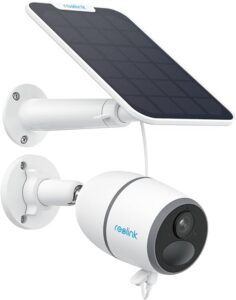
For situations where cellular is the right approach — no broadband available, but cell coverage exists — the Reolink Go Plus is a purpose-built solution. It runs entirely on 4G LTE with no Wi-Fi component at all, and the paired solar panel keeps its rechargeable battery topped up indefinitely, making it genuinely install-anywhere: construction sites, farms, vacation homes, remote gates, or any location without power infrastructure nearby.
Footage records to a microSD card (up to 128GB) automatically on motion detection, with an optional 7-day rolling cloud history included at no extra cost beyond the cellular data plan itself. Smart person and vehicle detection cuts down on false alerts from the kind of open, exposed environments these cameras typically monitor. 2K resolution with color night vision and two-way talk round out a camera built specifically for the no-Wi-Fi use case, not adapted from a Wi-Fi model as an afterthought.
Requirements: A nano SIM card and an active cellular data plan (compatible with AT&T, Verizon, and T-Mobile in the US) are needed before use — the camera itself does not include an ongoing data plan.
What You Give Up Without Wi-Fi
Being honest about the trade-offs matters more than pretending there aren’t any:
- No instant push notifications from pure local-storage cameras — you won’t know something happened until you check the footage
- No live remote viewing from local-only setups — you have to be on-site or physically connected to see anything in real time
- Storage limits — local recording eventually fills up and overwrites old footage; a typical 2TB drive on an 8-camera NVR system holds roughly 10–14 days of continuous HD footage, or several months if set to record only on motion
- Ongoing cellular costs — the one approach that does preserve remote access (cellular) comes with a recurring data plan cost, which is its own version of a subscription even though it’s not a cloud storage fee
- Physical theft risk — footage stored only on an in-camera SD card is lost if the camera itself is stolen, unlike NVR setups where the recorder is typically hidden indoors
Which Approach Fits Your Situation
| Your Situation | Best Approach |
|---|---|
| Rural property, no broadband, but has cell signal | Cellular (4G/5G LTE) camera |
| Want maximum reliability, don’t need remote access | Wired PoE + NVR |
| Whole property coverage, willing to run cable | Wired PoE + NVR |
| Simple, temporary, or budget monitoring | Local SD card only |
| Privacy-focused, want zero external network exposure | Wired PoE + NVR (fully closed-loop) |
| Have home Wi-Fi, just want no subscription | Standard local-storage WiFi camera (see our security cameras guide) |
Frequently Asked Questions
Will my Wi-Fi security camera stop recording if the internet goes down?
It depends entirely on how the specific camera stores footage. Cameras with local storage (a built-in microSD card, or a connection to a home hub/NVR) continue recording without interruption during an internet outage — only remote viewing and push notifications are affected. Cameras that rely purely on cloud storage with no local backup stop recording entirely the moment their internet connection drops, which is precisely the scenario a determined intruder might try to create.
Do cellular security cameras need a SIM card and data plan?
Yes — cellular cameras require an active nano SIM card and a cellular data plan (typically prepaid) to transmit footage and enable remote viewing. Without an active plan, the camera can’t communicate over the cellular network, though some models can still record locally to an SD card in that scenario.
Can I view live footage from a camera with no Wi-Fi or cellular?
Only if you’re physically close enough to connect directly to the camera’s local access point (a short-range Wi-Fi signal the camera itself broadcasts), or if you connect a monitor directly to an NVR via HDMI. There’s no way to view live footage remotely from a location with zero connectivity of any kind.
Is a wired PoE camera system more secure than a wireless one?
In several meaningful ways, yes. A closed-loop wired system has no wireless signal to intercept or jam, and typically no dependency on external cloud servers that could theoretically be compromised. It also tends to be more resistant to signal interference and doesn’t share bandwidth with other devices on a Wi-Fi network. The trade-off is installation complexity — running Ethernet cable to every camera location is more involved than mounting a wireless unit.
How long can a camera without Wi-Fi record before running out of storage?
It depends on storage capacity and whether recording is continuous or motion-triggered. An 8-camera NVR system with a 2TB drive typically holds 10–14 days of continuous HD footage; switching to motion-only recording can extend that to several months. Standalone cameras with a microSD card generally hold less — often days to a few weeks depending on card size and activity level — and automatically overwrite the oldest footage once full.
The Bottom Line
Security cameras absolutely work without Wi-Fi — the only real question is which of the three paths (local storage, wired PoE/NVR, or cellular) matches what you actually need. If you want genuine remote access without any home internet, cellular is the only option that delivers it, at the cost of an ongoing data plan. If reliability and zero external network exposure matter most, a wired PoE and NVR system is hard to beat. And for simple, budget-conscious monitoring where checking footage in person is acceptable, local SD card storage alone gets the job done.
For complete whole-property coverage using the wired approach, see our best NVR systems without subscription guide. For standard Wi-Fi cameras with full local storage and no subscription, see our best security cameras without subscription guide.