

This post contains affiliate links. If you buy through our links we may earn a small commission — at no extra cost to you. This never influences our recommendations.
Every camera on this site’s recommended lists has one thing in common: a microSD card slot or hub connection that lets you record locally with zero ongoing cost. Google Nest cameras have none of that — not one model in the current lineup includes a local storage option at all. This isn’t a minor gap; it’s the single most important thing to understand before buying into the Nest ecosystem, and this guide covers exactly what it means in practice.
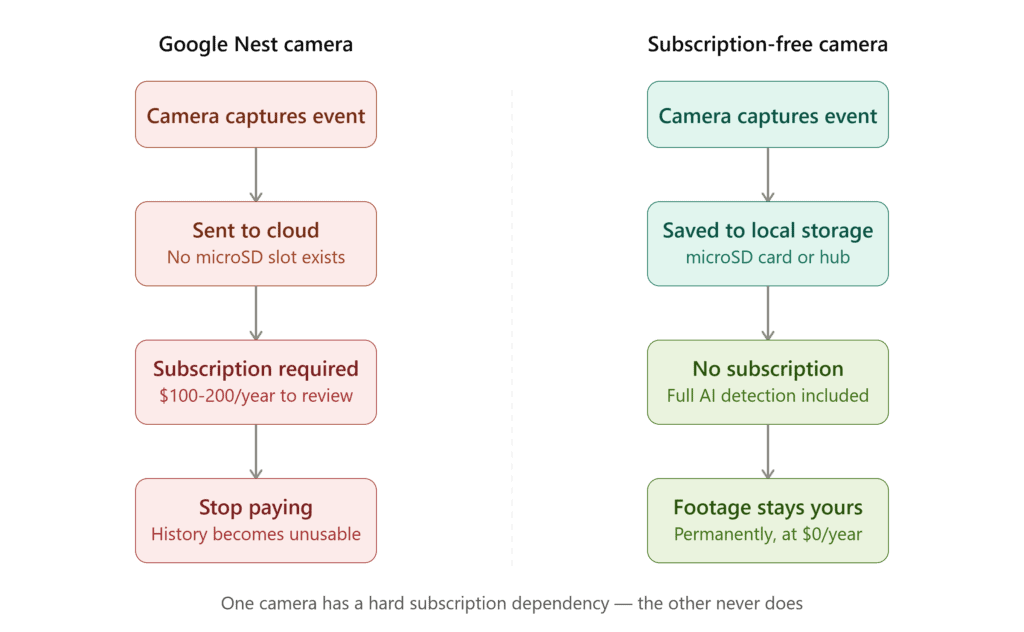
The Core Difference: Nest Has No True Local Storage, Anywhere
This is worth stating plainly since it’s easy to assume otherwise: no Google Nest camera, in any generation, has a microSD card slot or supports local recording to a hub the way eufy, Reolink, or Tapo do. Every recording depends on Google’s cloud infrastructure and an active Google Home Premium subscription. Without one, Nest cameras function for live viewing and real-time alerts only — motion and sound notifications work, two-way audio works, but nothing gets recorded anywhere you can review later.
The “Local Storage” Feature That Isn’t Really Local Storage
Google has introduced something worth understanding carefully rather than taking at face value. Newer Nest Cam (Battery) models can store up to roughly one hour of footage locally — but specifically only as a backup during a power or internet outage, and you can’t actually access or review that buffered footage directly. Once power and connectivity are restored, the buffered clips upload to the cloud automatically, and cloud access is the only way to see them. This is fundamentally different from genuine local storage on a eufy or Reolink camera, where footage lives on your own hardware permanently and you can review it with zero cloud dependency at all, even months later.
What a Nest Subscription Actually Costs
Google Home Premium (which replaced the Nest Aware naming in late 2025) is priced per account rather than per camera — a genuine advantage for multi-camera households compared to brands that charge per device. The Standard tier runs roughly $100/year (about $10/month) for 30 days of event history across unlimited cameras, with a Premium tier around $200/year extending that to 60 days plus additional AI features. For a household running just one or two Nest cameras, this is a meaningful ongoing cost with no way to opt out and still have usable recorded footage. For a household running many cameras, the flat per-account pricing is actually more reasonable than it first appears compared to some competitors’ per-camera subscription stacking.
Where Nest Genuinely Has an Edge
Google ecosystem integration. If your home already runs on Google Home, Nest Hub displays, and Google Assistant, Nest cameras integrate more natively than any third-party brand can match — a real, non-trivial advantage for households already invested there.
Image quality on newer models. The Gemini-powered generation offers 2K HDR video and improved AI-driven alerts and summaries — competitive with, though not clearly superior to, the 4K options available from Reolink and eufy at similar or lower price points.
Unlimited cameras under one flat subscription. For households planning many cameras and already committed to paying for cloud storage regardless of brand, Nest’s per-account pricing model is genuinely more cost-effective than per-camera subscription stacking once you cross roughly 3-4 cameras.
Where Subscription-Free Alternatives Clearly Win
Zero ongoing cost, permanently. A Reolink or eufy camera with local storage costs nothing to keep recording, forever, once purchased — no account, no monthly fee, no functionality loss if you decide to stop paying.
Genuine offline reliability. Cameras with true local storage keep recording through an internet outage with zero functional degradation. Nest’s one-hour buffer is a stopgap, not equivalent functionality — and it’s useless for review until connectivity returns and the clips sync to the cloud.
Higher resolution at comparable or lower prices. Reolink’s Argus 4 Pro delivers true 4K dual-lens coverage — a genuine step up from Nest’s 2K HDR — with full AI detection included free, covered in our Reolink Argus 4 Pro review.
No functionality loss without a subscription. Every subscription-free camera recommended on this site delivers full AI detection, local recording, and playback with zero payment required — a fundamentally different value proposition than Nest’s “live view only, no recording” free tier.
Which Fits Your Situation
| Your Priority | Better Fit |
|---|---|
| Avoiding subscriptions entirely, permanent local footage ownership | Subscription-free alternative (Reolink, eufy, Tapo) |
| Deep Google Home / Assistant ecosystem integration | Google Nest |
| Highest resolution and image detail for the price | Subscription-free alternative |
| Many cameras, already committed to paying for cloud regardless | Google Nest (flat per-account pricing) |
| Reliable recording through internet outages | Subscription-free alternative |
| Want full AI detection without ever paying extra | Subscription-free alternative |
Frequently Asked Questions
Does any Google Nest camera have a microSD card slot?
No — no model in the current or past Nest camera lineup includes a microSD card slot or any form of genuine local storage. All recorded footage depends entirely on an active Google Home Premium subscription and Google’s cloud infrastructure.
Can I use a Nest camera without any subscription at all?
Yes, but with significant limitations — you get live viewing, real-time motion and sound alerts, and two-way audio, but zero recorded video history. Once an event passes without a subscription active, there’s no way to review it afterward, making the free tier functional for live monitoring but not for genuine security evidence purposes.
What is Nest’s “local storage” feature actually for?
It’s a limited backup buffer on newer Nest Cam (Battery) models, storing up to roughly one hour of footage specifically during a power or internet outage. You can’t access this buffered footage directly — it automatically uploads to the cloud once connectivity is restored, and cloud access is the only way to view it. It’s not a substitute for genuine, permanently accessible local storage.
Is Google Nest more expensive than subscription-free alternatives long-term?
For most households, yes, significantly — a subscription-free camera costs nothing to keep recording after the initial purchase, while Nest requires an ongoing $100-200/year subscription indefinitely to maintain any video history at all. The gap narrows somewhat for households running many cameras, since Nest’s flat per-account pricing beats per-camera subscription stacking at scale.
What are the best subscription-free alternatives to Google Nest?
For outdoor coverage, the Reolink Argus 4 Pro delivers 4K resolution with full AI detection at no ongoing cost. For whole-property coverage, the eufyCam S3 Pro system offers expandable local storage. See our best security cameras without subscription guide for the complete lineup.
The Bottom Line
Google Nest’s complete lack of local storage is the single most important thing to understand before buying — this isn’t a brand with an optional subscription tier, it’s a brand where recorded footage simply doesn’t exist without one. For households deeply invested in the Google ecosystem, that trade-off may be worth it. For anyone specifically prioritizing subscription-free operation — the entire premise of this site — Reolink, eufy, and Tapo all deliver genuinely full functionality, including AI detection and permanent local recording, with zero ongoing cost.
For the full lineup of subscription-free security cameras, see our best security cameras without subscription guide. For comparisons against other subscription-based brands, see our Ring vs Eufy and Ring vs Reolink guides.