

This post contains affiliate links. If you buy through our links we may earn a small commission — at no extra cost to you. This never influences our recommendations.
Wyze started in 2017 with a single $20 indoor camera that undercut established brands by a wide margin — it’s since grown into a full budget smart home catalog spanning cameras, doorbells, locks, sensors, lighting, and more, all controlled through one app. This guide covers how the ecosystem actually fits together, what the Cam Plus subscription unlocks versus what’s genuinely free, and which already-reviewed Wyze products are worth buying.
The Core Value Proposition
Wyze’s entire pitch is straightforward: deliver most of what premium brands offer at a fraction of the price. A Wyze Cam v4 running $36 with 2.5K resolution and color night vision genuinely competes with cameras costing two or three times as much, and that pattern holds across most of the catalog — doorbells, locks, and sensors all undercut Ring, Nest, and Arlo pricing while matching or beating them on core hardware features.
What’s Actually Free vs What Requires Cam Plus
| Feature | Free | Requires Cam Plus |
|---|---|---|
| Live viewing | Yes | — |
| Local recording (microSD) | Yes | — |
| Cloud event clips | 12-second clips, 5-minute cooldown | 14-day rolling storage, no cooldown |
| Person/pet/vehicle/package detection | Basic motion only | Full smart detection |
| Facial recognition (Friendly Faces) | No | Yes (restricted in some US states/cities due to biometric data laws) |
This is worth understanding clearly: without Cam Plus, a Wyze camera still records locally via microSD with zero subscription required — full 24/7 local recording works fine on the free tier. What the free tier doesn’t include is smart AI-based detection (person vs. pet vs. package) or extended cloud clip history; without a subscription you get basic motion-only alerts on the cloud side. Cam Plus runs about $5/month per camera — among the cheapest smart detection tiers in the industry — with a newer Cam Unlimited tier covering all cameras under one account for households running several.
Ecosystem and Smart Home Integration
Wyze integrates with Amazon Alexa (full live view, Alexa Routines, Echo Show display) and Google Home (voice commands, Nest Hub live feed), plus IFTTT for custom automations. Home Assistant integration is possible via third-party RTSP firmware rather than an official, polished integration. Apple HomeKit is not natively supported — some users bridge Wyze devices into HomeKit using third-party tools like HomeBridge, but this isn’t an official or guaranteed-stable path. Wyze also has no Z-Wave, Zigbee, or Matter support, meaning it doesn’t connect into a broader third-party smart home hub the way some competitors do.
Within Wyze’s own ecosystem, cameras work with Wyze Plug and Wyze Bulb for motion-triggered lighting automations — a genuinely useful, low-cost way to build basic automated responses without needing a separate smart home platform.
Already-Reviewed Wyze Products Worth Buying
Wyze Cam v4
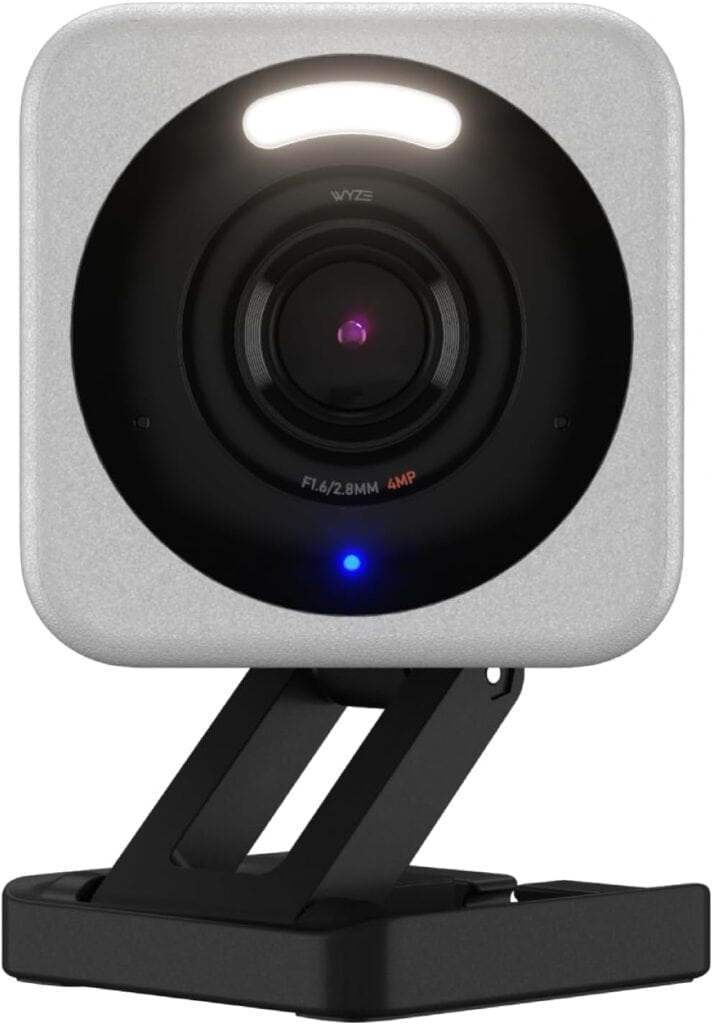
At roughly $36, this delivers 2.5K resolution, genuinely vibrant color night vision, and full AI detection (with Cam Plus) at one of the lowest prices in the category — a strong pick for budget-conscious buyers or anyone covering multiple areas of a property where cost per camera adds up quickly. See our full Wyze Cam v4 review for the complete spec breakdown.
Wyze Video Doorbell v2

Under $40, this delivers 2K resolution and genuinely subscription-free continuous local recording — a real upgrade over the original v1, which required a subscription for any recording at all. See our full Wyze Video Doorbell v2 review, including an honest note on the microSD slot’s physical placement.
Wyze Auto-Lock Bolt v2

At under $80, this delivers fast AI-learning fingerprint entry and built-in Wi-Fi with zero subscription required for core functionality. See our full Wyze Lock Bolt v2 review, including an honest note on its IP53 weatherproofing rating.
The Airbnb Starter Pack — A Genuinely Useful Bundle
For anyone managing a short-term rental, Wyze packages a video doorbell, a smart lock box, a keypad, smart plugs, and night lights together specifically for this use case — a genuinely practical, budget-friendly way to outfit a rental property with basic smart access and monitoring without piecing together individual products yourself.
What to Know Before Buying Into the Wyze Ecosystem
No 5GHz Wi-Fi support. Every Wyze camera connects via 2.4GHz only — confirm your router broadcasts this band if you’ve configured it to prioritize 5GHz exclusively.
No Apple HomeKit, Z-Wave, or Matter. If your smart home is built around any of these standards, Wyze devices won’t integrate natively — Alexa and Google Home are the two supported ecosystems.
Smart features increasingly require Cam Plus. Some functionality that was previously included free (like basic person detection on certain models) has shifted to require a subscription over time — worth checking the current feature set for any specific camera model before assuming full functionality is free.
Frequently Asked Questions
Do I need a Cam Plus subscription to use Wyze cameras?
No — live viewing and local microSD recording both work completely free. Cam Plus specifically unlocks smart AI detection (person, pet, vehicle, package), extended 14-day rolling cloud storage, and removes the 5-minute alert cooldown on the free tier.
Does Wyze work with Apple HomeKit?
Not natively — Wyze officially supports Alexa and Google Home only. Some users bridge devices into HomeKit using third-party tools like HomeBridge, but this isn’t an official, guaranteed-stable integration path.
What’s the difference between Cam Plus and Cam Unlimited?
Cam Plus is a per-camera license (roughly $5/month) covering one camera’s smart detection and 14-day cloud storage. Cam Unlimited is a broader account-level tier covering all cameras under one subscription, more cost-effective for households running multiple Wyze cameras.
Can Wyze cameras record locally without any subscription?
Yes — local recording to a microSD card works fully without any subscription on most current Wyze cameras. The subscription specifically adds cloud-based smart detection and extended clip history, not basic local recording capability.
Does Wyze support Home Assistant?
Indirectly, via third-party RTSP firmware rather than an official native integration — a workable path for technically comfortable users, but not as polished or guaranteed-stable as brands with dedicated Home Assistant integrations. See our best NVR for Home Assistant guide for more on this broader topic.
The Bottom Line
Wyze delivers genuine value across its lineup — real hardware features at prices that consistently undercut premium competitors, with local recording that works free of any subscription. The trade-offs are a narrower smart home ecosystem (no HomeKit, Matter, or Z-Wave) and a subscription structure that’s grown more feature-gated over time. For budget-conscious buyers building out cameras, a doorbell, and a lock without breaking the bank, the three products already reviewed on this site remain solid, capability-focused picks.
For the full lineup of subscription-free security options across every brand, see our best security cameras without subscription guide.